Designing a Healthy Work Environment!!!

Productivity is the name of the game in any business, but who can be productive when everyone in the office is feeling ill or out of sorts? Creating a positive and healthy work environment yields happy and healthy employees. Below are some tips to help you design your office for optimum health and productivity.


Lose the Old Cubes

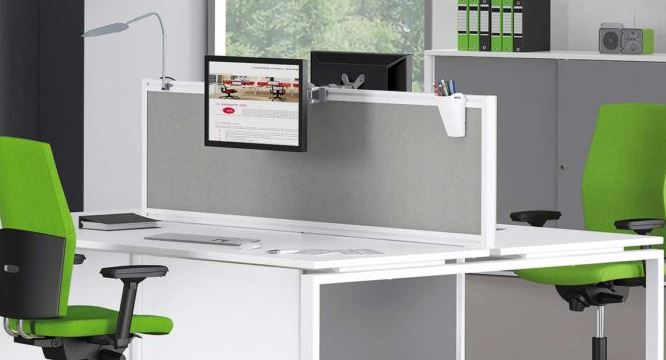
Large, old office cubicles can be downright depressing. They are often dull in color and very clinical-feeling. They also exude an air of isolation and solitude. Most newly designed cubicles are built to be more functional rather than closed off cubes. If you’re opting for more of an open office layout, partitions can also help with privacy and come in a variety of fabric-covered walls and cheerful color options.


Let There Be Light

Nothing is more depressing that dim lighting in an office workspace. Shadows in the corners and flickering fluorescents belong in a horror film; not in an office environment. Trade out fluorescent lights for bright LEDs. Choose daylight bulbs for an even cheerier feel. Sunlight keeps us awake, and therefore more productive. As an added bonus, LEDs use less energy. Now you are increasing production and saving money at the same time.


Keep it Clean

Design your office space with two main themes in mind: Clean and Simple. Cluttered offices often lead to cluttered minds. Encourage employees to limit the number of personal items on their desks. Too many potted plants and boxes of tissues create a feeling of disorder and confusion.


Use colors that are bright and clean. These are typically the cooler colors on the color wheel. Warm tones of yellow, orange and brown are too earthy. If you choose a shade in this category, try to lean toward the very lightest shades available.


Dress office windows with a light and airy window treatment. Shy away from clunky blinds that collect dust and allergens. Instead, allow windows to provide maximum light by keeping the glass clean and bare.


Floors should be easy to clean and neutral in color. Opt for low-pile carpet to avoid the echo-effect of tile or laminate. Deep-pile carpet is hard to vacuum, and it tends to show wear and tear much quicker than commercial-grade carpet. A protective plastic chair guard at each desk will prolong the life of the floor and prevent spills from reaching the carpet.


Make Some Noise

Most people think of offices as quiet, noiseless chambers. The clickety-click of typing and the ringing of phones are the only sounds that break the silence. This heavy silence can actually be oppressing to the office workers. A random cough or sneeze may make employees feel self-conscious if the room is too quiet. Soft background music is helpful to encourage a healthy mood.


Make a Break for it

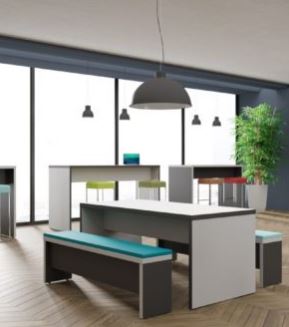
Don’t forget to include the break room in your healthy office design. Employees need a clean and friendly environment to rest and recharge.

A dusty coffee pot and dingy counter tops are not going to cut it. Keep the clean and simple approach in the foreground as you design this area.

Provide a refrigerator for employees to place healthy lunches from home, and make sure to include a microwave for reheating them. Keep surfaces smooth and easy to keep clean, and avoid carpet in this area. Opt instead for laminate, tile, or linoleum. Bring the lights down a bit to allow employees to rest and relax.

Cheerful fabrics and wall colors will encourage cheerful attitudes, but be careful not to go overboard with busy designs and loud colors.
 

Air and Water

Finally, remember the essential elements to good health as you design the perfect work space. Our bodies are comprised of over 50% water. That makes the water we consume essential to our health and well-being.

Air quality is another valid concern. Hire a cleaning service to schedule regular office cleanings to minimize dust, and install air purifiers around the office to improve air quality.

Having the air ducts professionally cleaned can also improve breathing conditions in the office. Large amounts of dust collect over time, reducing air quality and performance of central air and heating systems.


Health Equals Wealth

The golden rule when striving for a healthy work environment is that health equals wealth. All of these improvements in the office will come back ten-fold in the production and longevity of your employees. Make the investment and you will certainly reap the return.


Call us on 021 4277841 to discuss some of the products featured or leave a comment below.
Keeping Cool in the Office!!

When it’s too hot and humid, it’s easy to lose focus and become sluggish or irritable which can make work very challenging. In worst case scenarios, people can become ill or worse. So keep cool by being proactive about taking care of yourself amidst the hotter weather. The obvious answer to keeping cool indoors in a warmer climate is to get air conditioning, but maybe you work someplace where that just isn’t an option, or maybe air conditioning is already installed, but it doesn’t work as well as you would like. Or maybe you have a home office, and prefer not to use air conditioning. There can be many reasons for not turning on the air.


The good news is that you really can survive the heat without AC

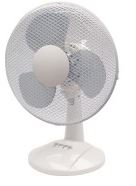
Electric fans definitely help with beating the heat. A desk fan that rests easily on your desktop will keep your face and upper body nice and cool. While tall standing fans can help with reducing the temperature in the room.


Proper, healthy nourishment

Eating whole, natural foods are best. In the hot weather, it becomes more difficult to metabolize certain foods such as fattier meats and foods that are highly processed. So instead of that ½ pound burger at lunch, opt for a delicious, spicy salad; perhaps with chick peas and kale if protein is what you’re looking for. This way, you’re still getting plenty of nutrients, but via food that is easier for your body to process—and you can eat it cold!


Drinking plenty of water

Hydrate often and limit your caffeine consumption, as caffeine will dehydrate you. Pure, clean water is best, and when it’s very warm, you might find that you need more than usual. On average, a person should consume about eight 8 ounce glasses of water per day. Listen to your body. Making sure your office has a water cooler is also important.


Dressing in clothes made from natural, lightweight materials

Knit or woven cotton, linen or silk clothing are great for the summer months. White and light-colored clothes are best if you happen to be outdoors.


Other cool thoughts

Additionally; a nice, ergonomic, mesh task chair for working at your desk is a lighter, cooler option for warm days. Frankly, a good mesh task chair is outstandingly comfortable year-round. Last but not least, turn off the lights if possible, and close the blinds to keep the sun out—this will help tremendously.


Call us on 021 4277841 to discuss some of the products featured or leave a comment below.

6 Tips on Incorporating Ergonomics With Your Standing Desk!!

Looking to upgrade to a standing desk, or have you recently purchased one? Either way, congrats! A standing height desk is a great alternative to a traditional desk and they have many desirable features, as well as plenty of options available to choose from.

When converting to a stand up desk, it’s easy to forget about or let the ergonomics part of it to fall to the wayside.

Below we’ve broken down some of the things to pay attention to when upgrading your workstation with a standing desk, so that you make sure you’re working in a healthy working environment.


Posture

There is a lot to be said about how to sit properly in your office chair, but not so much about standing. Some tips on proper posture include placing your legs at shoulder width without locking your knees and slightly staggering your stance with one foot in front of the other.

Desk Height

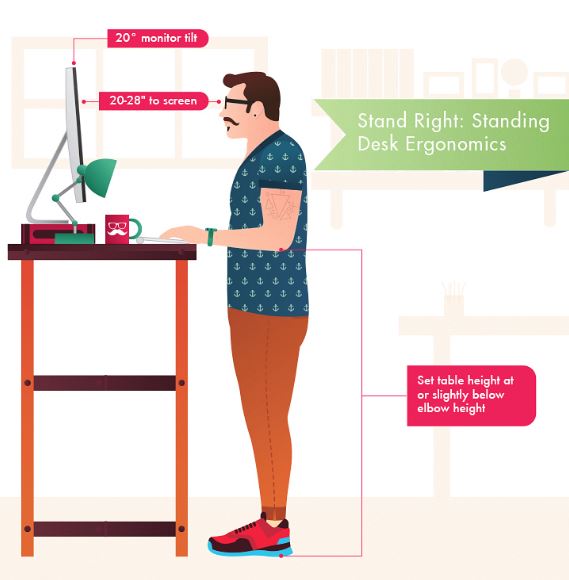
The height of your sit stand desk should be adjusted according to your height. Set the height of your desk( slightly below elbow) so that you’re able to comfortably type on your keyboard without straining your neck or any other muscles.


Monitor

Make sure that your monitor is eye level. You shouldn’t be straining your neck or your eyes to read what’s on the screen. That means that your neck shouldn’t be forced in an uncomfortable position and your eyes should at least be an arms length away from your computer screen.


Keyboard

Once you have your monitor properly adjusted, the setup of your keyboard shouldn’t be far off. Make sure that your wrists are straight. Possibly use a wrist rest if you can.


Lighting

Having multiple sources of light is also a good idea to keep you from straining your eyes. We recommend to let in some natural light if you can, as well as having a task light on hand in addition to office lighting, that way, if the office lighting is too dim, you can always use your task light as an additional light source.


Accessories

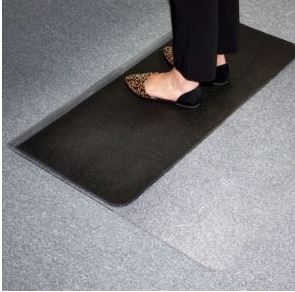
Some standing desk accessories to consider include an anti-fatigue chair mat or a foot rest to take some of the pressure off of your feet, especially if you’re standing all day.


In summary, while standing desks can be a great alternative to sitting, its equally important to pay attention to the ergonomics and health of it as well.


Call us on 021 4277841 to discuss some of the products featured or leave a comment below.
Is your business secure? GDPR Ready!

Information security is now more vital to the survival and success of businesses than it’s ever been before.  There are various factors contributing to this new urgency:

Cyber security is the biggest threat to the survival and success of modern businesses. Companies of all sizes are at risk of falling victim to disruptive attacks such as phishing, Distributed Denial of Service (DDoS) or ransomware – the costs of which run into the millions.


Government regulations such as the GDPR are increasingly looking to punish businesses with potentially crippling fines for failing to secure their systems and data appropriately.


The expansion and digitisation of the modern workplace compounds cyber challenges further: as workflows spread across devices, networks and geographies, information must be protected as it moves around a business.


The capabilities of office printers and multifunction devices have increased ten-fold in recent years. They are now responsible for a huge proportion of business data input, output, transfer and storage. This potentially makes them one of the most dangerous, yet often overlooked, threat vectors in the workplace today.


Faced with these challenges, modern businesses can no longer function without fundamentally secure document and data management systems.

Now more than ever, businesses need a partner they can trust to help them secure and protect their information management.

                  Four things to think about to secure your business


This combination of security threats and legislative requirements means the potential for reputational and fiscal damage from cyber risk has never been greater.

Now is the time to invest in the security of your digital workplace with a partner you can trust.


The good news is, Ricoh has already thought about security for you. We are expert in understanding these risks because we’ve spent decades developing ways to mitigate
them, through state-of-the-art security measures embedded into every product and solution across our entire portfolio.


Our printers, for example, have featured secure hard disk overwrite capabilities for over 20 years. Security is in the DNA of our entire digital workplace portfolio. Ricoh provides a consistent worldwide service and support structure for customers that ensures threat intelligence is efficiently shared and acted upon.

Not only is IEEE 2600 certification implemented as standard across our printout put devices, Ricoh is a leading member and key author for the IEEE Standards Association.


Ricoh is also ISO 27001 certified, and committed to continuing to comply with this information security management system. To meet the demanding requirements of effective,
demonstrable cyber security best practices, security is included in every product and service in Ricoh’s portfolio by design – never as an afterthought. We believe this holistic view of vulnerabilities is essential for survival in modern business. Every aspect of our security approach is underpinned by our ‘CIA’ principles of privacy and security: confidentiality, integrity and availability


How Ricoh, partners of Ronnie Moore, secures the digital workplace


We understand the importance of securing your digital workplace across the entire – and complex – lifecycle of business data.

We achieve this by only supplying you with machines that implement security measures across four crucial stages: Control, Preservation,Destruction and Support.


The modern digital workplace must be as dynamic as the cyber threats it faces and as flexible as the working practices within it. That’s why we believe that cyber security should operate seamlessly across the technology our customers choose to enable their workplace.


With our commitment to ISO 27001 throughout our organisation, and IEEE 2600 certification across our products, you can rest assured that with Ricoh you’ll have best-of-breed security controls in place – no matter how you choose to structure and grow your business.


To discover how Ricoh can help you secure and empower your business, visit them at ricoh-europe.com
or contact us on 021-4277841 for more information on the Ricoh machines we distribute.


Tips On Organizing Your File Cabinets!!

Organization. That twelve letter word you either love or hate. The good news is, you’re here to make changes, so kudos to you! Now, let’s get down to the nitty gritty of what that means with your filing cabinet. Below are four ways to get your filing cabinets in working order.


Color code

If you haven’t started using a color coding system to help organize your filing cabinet, you need to hop on it! If you have started, but need to step up your game, now is the time! Colored labels and colored folders are extremely helpful in organizing your documents and making them easy to find.


Add labels

Labels sound like a no-brainer, but I’m sure some of you out there don’t use them! Something to also consider if you have a habit of re-labeling folders, is to write in pencil versus pen or marker


Shred old, unnecessary files

Old files can pile up quickly and cause you to have a lot of extra junk you don’t need that takes up space. Consider going through your drawers and auditing your existing files to see what you should keep and get rid of. Its also a good idea to schedule some time to do this regularly throughout the year, so that you can keep on top of it rather than sitting for hours on end cleaning it out.


Securio C14


File new documents or papers right away

Getting into a rhythm to file your documents right away can be hard. Its easier to let it pile on the desk next to you, or throw it in a folder labeled “organize”. But, with a little extra effort, you can make that a thing of the past saving you hours in the long run. Whenever you have something new you need to file, make a quick b-line to your filing cabinet and get that thing filed away pronto!


That wraps up our tips on keeping your filing cabinets organized. Now that it’s spring time, it’s the perfect opportunity to add this to your office spring cleaning list! If you have any questions about organizing your files, drop a comment below!


What causes a Paper Jam?


Paper jams are the most common frustration when it comes to shredding. When a jam occurs, it is usually due to overfeeding, mis-feeding or fast feeding paper into the shredder. By being aware of these common shredding mistakes, along with having a shredder with the right jam prevention technology, you can keep your shredding experience hassle-free.

Overfeeds

When too much paper is fed into a shredder at one time, this can cause a paper jam. Knowing the sheet capacity (or how many sheets your machine can handle) can help prevent jamming. Also, you can help eliminate overfeeds by having a shredder equipped with a jam prevention system that can electronically sense when too much paper has been inserted into the machine.

Mis-feeds

Inserting paper that is folded, creased or wrinkled can also cause a misfeed paper jam. A shredder with advanced jam prevention can power through mis-feeds or cleanly reverse out the paper so that it can be removed – both eliminating this cause of a paper jam.

Fast Feeds

Fast feeds are caused when a stack of paper is fed into the machine before the shredder has finished shredding the previous stack. Shredders equipped with an advanced jam prevention technology that can detect fast feeds will pause the shredder, allowing you to remove the excess paper before it turns into a paper jam.


How To Oil Your Paper Shredder For Consistent Performance

Like your car, your paper shredder needs to be oiled regularly to maintain optimal performance. To oil your shredder, simply hold down the reverse button. Squeeze oil across the entire paper entry while holding down the button. Hold down the reverse button for another 10 se

conds to ensure the lubrication has spread through the cutters. It only takes seconds to keep your shredder running well, as regular oiling prevents cutters from locking up over time.

What Oil Should You Use For Your Shredder?

Do not use aerosol oils to lubricate your shredder. Such lubricants are petroleum-based and can be a serious fire hazard. Use only vegetable-based oils like Fellowes Shredded Oil for all cross-cut paper shredders. Also use High Security Shredder Oil for large capacity paper shredders and Fellowes commercial shredders with the Auto-Oil feature.

How Often Should You Oil Your Shredder?

When you notice the shredder is experiencing difficulty shredding, or gets jammed easily, then it’s probably time to oil. If you use your shredder occasionally, then oiling your shredder may only be necessary every two months to maintain good performance. If you use your shredder a lot, however, then your best practices are to oil your cross cut shredder every time you empty the waste bin.

The Orb at Republic of Work

The Republic of Work is a new home for businesses in the heart of Cork City. 15,500 sq ft of pure innovation for businesses of all sizes, where ‘Innovation meets tradition’.  So where better to showcase Senator’s revolutionary desking solution, the Orb.  The desk that allows the liberalisation of space through 360 degree circular worktops. We’re not talking simply about cutting corners, far from it, Orb’s design permits a natural fluidity to the workspace allowing gentle crescents to be created through the simple interlocking of workstations.


Click on this link for further information Senator_SPEC_2016_DESKING_ORB_v7 WEB

Featured image taken from @republicofwork

New Regulation for the Protection of Data (GDPR)

The General Data Protection Regulation (GDPR) is the latest development in the current EU agenda to safeguard its citizens and their private information.

The GDPR introduces new rights for individuals and the changes require a review of your current approach and an assessment of the impact to your business and customers.


Penalties

A penalty for data breach may cost up to €20 million or 4% of your annual turnover.

Increased Territorial Scope

if you are transferring data outside of the EU, for any purpose, the terms of the GDPR will still apply

Internal Inventories

Although there are some exemptions for smaller organisations, in general you must have and maintain an inventory of all data you hold, the reasons for holding it and the other attributes, but not limited to retention, safeguards and data types.

Requirement of ‘data portability’

Customers will have the right to obtain and use their personal data for their own purposes across different services. You will havw to be able to provide customers with a machine readable copy of their data.

The ‘right to be forgotten’

Customers now have the right, in certain circumstances, to have data about them erased, removed or de-indexed. Are your IT systems and business processes able to take this into account?

Data Subject ‘consent’ Required

Businesses must be able to demonstrate that the consent of the data subject was presented in a manner which is clearly distinguishable and specific to the purpose for which it will be used. Consent can no longer be by default or implied.

Data Protection Office (DPO)

A DPO is a new role where certain organisations will be required to have depending on the type and volume of data beign processed.

Data Protection Impact Assessments (DPIAs)

The regulation requires business to carry out DPIAs where the processing is likely to result in a high risk to the rights of individuals and particularly when using new technologies, taking into account the nature, scope, context and purpose of the processing.

Reporting Data Breeches

In addition to reporting requirements from other regulations, the GDPR will require communication with the Data Protection Commissioner within 72 hours and/or informing the affected data subjects ‘without undue delay’ in high risk cases.

Subject Access Rights

Data subjects will enjoy stronger access rights. Where an access request is received, you must respond within the shorter time frame of one month and cannot charge a fee unless the request is manifestly unfounded or excessive.


www.dataprotection.ie

The compliant due date is 25th May 2018.


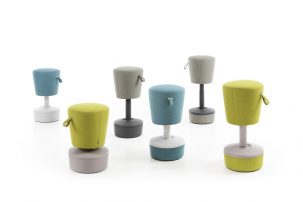
New Ergonomic Seat – Mickey


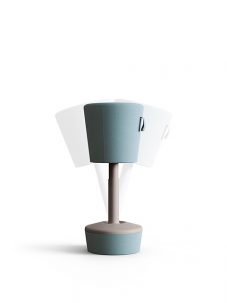
Mickey meets the requirements of today’s modern jobs and is perfectly in line with the concept of the Activity-Based Workplace.


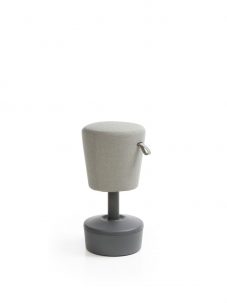
The Mickey is highly ergonomic and can be used for active desk work, both seated and standing. It also follows the position flawlessly with a built-in 10 degree tilt to either side. These changes of position during work provide active support for the spine. It is a perfect companion for sit-stand desks.


The seat swivels and swings from side to side, has a height adjustment that goes from a low pouffe to a seat providing support during standing work, and can serve different needs – either quick conferences for several people or sitting at a desk with someone for a while. Secondly, thanks to a special handle, the seat can be easily moved, rearranged and have its height adjusted all at the same time! Mickey can be order in pastel or more expressive colours of upholstery and combine with neutral plastic colours gives opportunity to create creative spaces for spending time together.


The Mickey is highly ergonomic and can be used for active desk work, both seated and standing. It also follows the position flawlessly with a built-in 10 degree tilt to either side. These changes of position during work provide active support for the spine.


Call into our Showroom, take a seat and see for yourself!

Mickey (L)


Open plan office workers “are less happy”

Do you work in an open plan office?

Are you less happy than your colleagues who enjoy their own office space?


An article in the Daily Mail written by Victoria Allen talks about a study which found open-plan offices are affecting employees’ job satisfaction.


“Being surrounded by others – with the accompanying noise and smells of food – makes staff less happy and is linked to increased sick leave and stress levels, researchers said.  The study led by Karlstad University in Sweden surveyed 271 workers, and found their satisfaction dropped as the number of people they shared an office increased.  It is best to have your own office – which researchers call a ‘cellular’ space – or share with only one or two people to better enjoy the working day, the results suggest.


The authors, led by Dr Tobias Otterbring,wrote: ‘Extensive research shows that open-plan (vs cellular) offices are linked to decreased ease of interaction among co-workers, decreased levels of job satisfaction, and job performance and productivity.  In addition, compared to cellular offices, such open-plan work spaces are linked to decreased well-being and other negative health-related outcomes, such as increased sickness absence, and higher levels of stress, distraction, and disturbance.’


The research concludes ‘Companies may wish to consider these findings before switching to such open office layouts, since their purported financial savings may be substantially lower than the costs associated with decreased job satisfaction and well-being and increased sickness absence'”