Common Printer Problems & the Solutions!!

Printers are a great thing and an irreplaceable office asset, until they start presenting a maddening range of problems for their users.

They run through ink, output quality may be flawed and sometimes they just refuse to print at all, which is infuriating.

While working in a busy office, diagnosing printer problems can end up on the back burner. Luckily, these situations are resolvable.

Listed below are some of the most common printer problems and, better yet, some solution tips.


1 – PAPER JAMS


The paper jam is the most common copy machine error encountered.

There are many reasons for paper jams, a few of the most common, and quick fixes, are:


Humidity and old paper – paper sitting in the tray for long periods of time can absorb moisture from the air and become “sticky” Remove old paper and fan the edges. If that doesn’t work, replace the paper.


Wrong paper size – use the right size for the print job at hand


Wrong paper settings – adjust your copier settings when using different paper stocks


Drawer alignment – be sure the drawer guides are tight against the edges of the paper


Torn edges, dog-eared corners, and forgotten staples can all create jams. It’s often faster to copy torn pages one at a time rather than trying through the paper feeder


Right side up – ever noticed the arrow on a ream of paper? It’s there for a reason. To load new paper:Find the arrow on the end of the ream of paper’s packaging


Add the paper to the copier with the top of the paper in the same direction as the arrow


Worn rollers – these help move paper through the machine. As they wear, the paper can “slip” and cause jams. Call your copier repair partner – don’t try to fix yourself!


2 – LINES ON PAPER


When you copy a piece of paper with simple text and/or images, but your finished copy contains streaks, lines or other deformities in the reproduction, you become frustrated.

There are multiple sources for this potential copy machine problem and they include:


Foreign substances on the scanner glass or mirrors


Drum or developer unit malfunction (only applies to multi-component copier systems)


Drum blade malfunction resulting in large lines vertically down the page


Issue with fusers


The first issue is resolved through removing interferences and cleaning the scanner glass and mirrors (see your user’s manual for proper cleaning instructions).

The remaining issues should be remedied by replacing the unit causing the issue; most often these should be addressed by contacting your service provider.


3 – WRINKLED PAGES


There is nothing professional about copy pages that come out of the machine crinkled.

Rather than looking like a consummate business professional, your employees show up for meetings or submit paperwork for reports that look like they were dug out of a student’s backpack.

Wrinkled pages are often the result of worn out feed and exit rollers that cause sticking or jamming. But, worn out paper trays, moisture caused by humidity and fuser assemblies can also lead to wrinkled pages.

If paper is noticeably damaged for any reason, do not use it.

For issues with paper trays, you can purchase replacements.

However, fixing the fuser assembly and feed rollers requires the assistance of a technician.


5 – COPIES ARE TOO LIGHT OR TOO DARK


The majority of the time, issues with light and dark on copy pages is going to be the result of an imbalance in the density controls on the copier.

Someone may have inadvertently altered the settings previously, making subsequent images copied too light or too dark. In this case, resetting the density levels is the best solution.

It is also possible however that the drum could be reaching the end of its work life or that the toner in the machine is bad. Some aftermarket toners are not up to manufacturer codes and can result in light density issues.

Replacements should be purchased and installed.


6 – SPOTS ON THE PAGE


Spots (called speckling) on the copied pages can be a result of smudges, dust, or grime on the copy mirror or the platen glass. That’s an easy fix – clean it (you should clean the glass on your copier at least once per month).

Spots on scanned pages can be automatically removed with imaging software, most packages have an automatic “despeckle” feature.

Spots from laser printers can be caused by a damaged photoconducter unit.

Remove and inspect for damage. If damaged, replace.

If only dirty, gently clean with a lint-free cloth. DO NOT touch the roller assembly when removing the unit.


Best Solutions: 


In addition to the solutions mentioned above, there are a few steps that you can take in your office to make sure your common machine problems are reduced.

First and foremost, make sure your Office is using the best quality and right sized machine for the amount its being used.

Here at Ronnie Moore we supply award winning RICOH photocopiers, that come in a range of sizes to accommodate your office needs.


Secondly patience is a virtue with these machines.

Never be forceful when it comes to loading and unloading paper from the machine. Second, make sure not to just put a Band-Aid on the machine.

Pay attention to the replacement timeline for vital parts and fixtures on the copy/printer machine to avoid even bigger problems in the future.

Third and final, have the machine cleaned professionally every once and a while.


Last photo linked to our website and you can call us on 021 4277841 if you would like more information on our award winning RICOH Photocopiers or leave a comment below.

Complete Guide to Office Desks!!

Despite ever-evolving technology in the workplace, desks are still very much a part of almost every office employee’s day-to-day work life.

It’s where your computer lives, it’s where you file away your documents and, when it comes down to it, your desk is your home away from home.

Whether you’re designing a home office or you need to replace the old desk in your corporate corner office, there’s a lot to choose from, and it can be tough to make a decision.

Here at Ronnie Moore we want you to have all the information so here is a comprehensive guide to office desks designed to give you a solid understanding of where to start your search.


What type of desk should I buy?


Executive Desks are commonly used in large offices with ample space to spare. These carved wood specimens impart a sense of grandeur and timeless appeal that stands apart from other styles.

These big desks almost always have a double pedestal design equipped with file and box drawers for housing office paperwork and supplies.

Executive desks are typically made up of a single work surface that is situated in the center of the office, but executive L-desks and executive U-desks also exist for those who find themselves in need of more space.


Computer Desks are scaled down versions of executive workstations that typically include work surface space for a desktop computer, filing drawers and wire management capabilities.

Computer desks are ideal for home offices and those that aren’t quite large enough for a big executive workstation.


L-Shaped Desks come with two connecting parts—a desk and a return. The desk portion is typically larger, while the return is skinny and meant to be used as additional work surface space.

L-desks come in a wide range of styles and sizes, making them a great choice for just about anyone who needs more desktop space in his or her work life.

Just take caution—some L-desks have an unfinished back and must be placed in a corner, so double check your product details if you’re planning on using one of these in the middle of a room.


U-Shaped Desks are similar to L-shaped desks, but they have three work surfaces which include a main desk, a bridge and a credenza.

U-shaped desks are typically very large, but compact varieties do exist. A U-desk is ideal for an individual who needs as much work surface space as possible in order to get his or her work done effectively.

U-desks almost always come packed with storage as well, so you can expect plenty of filing and utility space with this type of furniture.


Standing and adjustable desks allow the user to alternate between sitting and standing throughout the work day.

Standing desks are stationary and must be used in combination with a standard height desk or with an adjustable height stool.

Adjustable height desks have a work surface that can be raised and lowered either via an electric mechanism or a manual one.

Below is the amazing Leap Electrically Adjustable desk which is fast becoming our bestseller.


Reception Desk differ in size depending on space but most have a higher and lower side. Higher Side consists of storage and is important to keep information private.

Lower side is usually to greet clients and is where the receptionist sits.


Cubicles consist of a work surface that is surrounded by modular partitions.

Cubicles are great for use as employee workstations in a mid to large size company wherein there are a large number of employees to seat in an open area.


Laptop and writing desks have a table-like design that consists of a spacious work surface with no pedestals.

Any storage that may exist in one of these desks will be in the form of a pencil drawer and/or keyboard tray under the center of the work surface.

It is commonly recommended that mobile pedestals be used if additional storage is needed.


We hope this makes deciding on a desk a little bit easier.

All photos are linked to our website and you can call us on 021 4277841 to discuss some of the products featured or leave a comment below.


The Essentials of a Successful Break Out Room!!

Throughout a busy and often stressful workday, your employees need to have a place to go to decompress and relax. This is why many organizations steadfastly believe that it’s crucial to establish a positive break room culture and to continually adjust and refine this space to foster creativity and interaction.


Here are some tips on how to reconfigure your current break room so that your employees can mentally recharge, find new ways to collaborate and have a little more fun during the workday.


Make Your Break Room Stand Out Within Your Office


You can give your break room its own character by taking steps such as painting the walls a unique color or opening up the room to add a central seating area.

These types of changes make it clear that this room is different from the rest of your workplace.


This distinction is important because it will allow your workers to fully disconnect from their work space and decompress. When your employees return to work, they’ll start fresh, and productivity will substantially increase.

Our bench system below is a great unique way of changing up any break room.


Encourage Communal Dining


By providing larger, family-style dining tables as opposed to a slew of spread-out chairs, you can facilitate a more collaborative lunchtime spirit.

After all, employees who gather together to eat lunch will have the opportunity to bond as a team and share ideas.


Provide Furnishings That Promote Comfort


Why not try thinking of your break room design from a coffee house perspective?

After all, comfortable sofas and lounge chairs can greatly enhance a sense of relaxation in the midst of a frantic business day

Our modular easy chairs are great way of making your office break room seem less formal and more inviting to your employees.


Have Adjustable Desks/Tables


Sitting can be detrimental to your employees’ health. Take the time with your office remodel to add in stand-up desks and collaboration areas.

This can help decrease sedentary routines and shows you care about your employees’ health and well-being.

Our height adjustable desk below can be viewed in our show room and is a great asset to any office.


Host Celebrations in the Rejuvenated Break Room


Does your workplace culture value employee birthdays and milestones? If so, you can try hosting a celebration in the break room.

You can even reach out to a local caterer to deliver different breakfast or lunch fare and take advantage of this opportunity for the team to get to know any newer employees.

These types of events encourage a stronger sense of engagement and team culture.


Coffee, Coffee and more Coffee


It may seem like a simple idea but coffee is a great way to get your employees awakened and alert for the day.

Invest in a good coffee machine to keep even the pickiest coffee drinks happy.

Also provide teas and a water dispenser for the non coffee drinkers.


All photos are linked to our website and you can call us on 021 4277841 to discuss some of the products featured or leave a comment below.


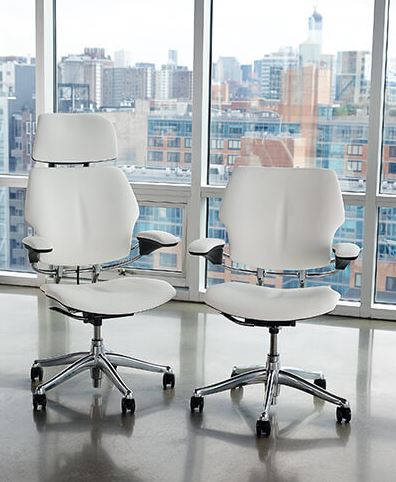
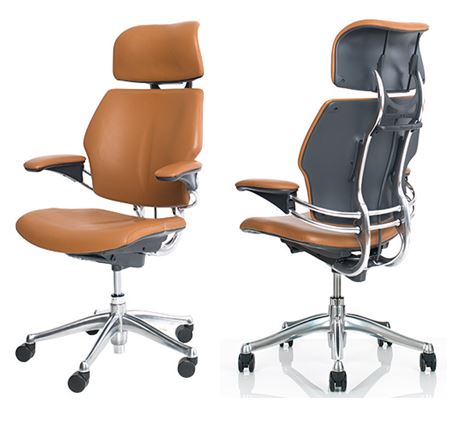
“The Gold Standard in Office Seating,” – Humanscale Freedom Chair

Described by The New York Times as “the gold standard in office seating,” the Freedom chair redefines the concept of traditional task chairs. Designer Niels Diffrient aimed to design an office chair that automatically adapts to the user, allowing them to move freely from posture to posture.

Diffrient’s unique approach removed complexities found in other chairs, such as cumbersome recline levers and back tension dials for a truly ergonomic task chair. As a result, he developed a recline mechanism that perfectly adjusts to the user, definitively reinventing modern task seating to be truly simple, functional and beautiful


Features:
Available in two versions, the everyday Freedom Task and the
executive Freedom Headrest, each chair includes the following
features:


  1.  Distinctive design sets it apart from other task chairs and
    enhances any space
  2. Innovative weight-sensitive, self-locking recline mechanism
    cleverly uses each sitter’s body weight to perfectly adjust
    the tension and recline position of the chair for full support
    throughout movement
  3. Pivoting backrest automatically moves with the user throughout
    the day and offers perfect lumbar comfort in all positions
  4. Synchronous arms allow effortless adjustment with one hand
    and our unique arm design attaches to the backrest to move
    with the user
  5. Contoured cushions are sculpted to closely follow the body’s
    shape and offer long-term comfort, reduce pressure points and
    provide exceptional weight distribution
  6. Modular design allows the user to update the aesthetic of the
    chair and offers easy maintenance
  7. A wide range of specifically created, high-performance textiles
    complement the chair’s unique cushion contours to maximize
    their comfort, performance and ergonomic function
  8. The Freedom Headrest features a dynamic support that cradles
    the head and neck during recline, but remains neutral when in
    upright positions


Available Options:


  1. Textiles: Range of four-way stretch fabrics, box-stitched

    leathers, antimicrobial textiles and non-stretch materials

  2. Stitch finishing: Choice of matching or contrasting box

    stitching is available with all leathers

  3. Cushions: Technogel cushions maximize weight distribution

  4. Arms: – Synchronous arms in duron, gel or matching textile

    – Advanced arms in duron, gel or matching textile

  5. Finishes: Graphite, Titanium and Polished Aluminum with

    Graphite or Titanium

  6. Cylinder: Low, Tall, High with footring and return to height

  7. Casters: Soft casters, glides or locking casters

    (lock when you sit down)

  8. Convenient coat hanger attachment

  9. CAL133

  10. Also available in a clean room compliant configuration


All photos are linked to our website and you can call us on 021 4277841 to discuss some of the products featured or leave a comment below.

Is it time for a new Office Shredder??

You’ve been putting off that paper shredder purchase for a while now, even though the one you have might be jamming, noisy, or filling up just too fast.

Here are few reasons to consider upgrading your current shredder!!


  1. Current Paper Shredder Needs to Cool Down Too Often


When you’re shredding and you see that red light, you know your paper shredder needs a break. You may need to wait awhile until the machine cools down and is ready to shred again. If you’re using an office shredder, this can take a lot of time out of your work day.


  1. Current Paper Shredder Fills Up Too Quickly


When you first bought it, the paper shredder bin capacity was probably okay for your needs. Now you may notice that you are shredding more and more often. It seems like you do nothing but empty that bin. It may be time to get a paper shredder with larger bin capacity, just more room for more shreds like the HSM B32 below.


  1. Current Paper Shredder Jams


You may put up with paper jams, for awhile. Eventually tearing half-shredded sheets out of the cutters tries your patience. Select a personal shredder with 100% Jam Proof technology and say goodbye to paper jams.


  1. Current Paper Shredder is Just Too Loud

If you shred a little, a noisy shredder is a nuisance. If you shred a lot, then it becomes an aggravation. End that endless whirring and grinding that drives everybody at home or in the office crazy. Get an office shredder or a personal shredder with quiet performance features.


  1. Your Shredder only shreds paper!


In this modern society not all personal information is on paper. CD/DVDS are still used to keep lots of personal and business information.

You shouldn’t just throw these in the bin when finished with them as the information is easily accessed. Our HSM shredders come with a particle Cut And Separate CD cutting Unit for you to to dispose of these securely.


All photos are linked to our website and you can call us on 021 4277841 to discuss some of the products featured or leave a comment below.

The 3 Most Common Ergonomic Hazards Found in Every Office (with Solutions)

Many people assume that working in an office is a safe and cushy job. While there are certainly many perks (such as A/C in the summer!), the truth is that there are a number of hazards that office workers face every day and, in most cases, these hazards are easily fixed.


Ergonomic hazards are unique. Most of us have the idea that a workplace hazard is an unsecured heavy load, high voltage wires or other obviously dangerous item or situation.  Where an ergonomic hazard differs from these more traditional hazards is that an ergonomic hazard in the office may not necessarily be noticed immediately. In fact, a lot of ergonomic issues will build over time before causing pain.


Carpal tunnel syndrome, chronic neck and back pain, frequent headaches, and more can all be symptoms of poor ergonomics in your office. If you spend much of the day working at your desk then you should ensure that your workspace not only has the tools to get the job done but to protect your body at the same time.


What is an Ergonomic Hazard?


Before you can start preventing injuries from ergonomic hazards in the office, you must understand what an ergonomic hazard is.


Simply put, an ergonomic hazard is a situation or behaviour that can lead to any number of musculoskeletal disorders. Ergonomic hazards are usually repetitive and long lasting actions that lead to painful injuries or conditions over time.

Here are three simple improvements that you can make to help improve your office’s ergonomics and avoid ergonomic injury.


  1. Inadequate or Worn Out Chairs


People who work in offices spend upwards of 7 hours per day sitting at their desk. Having a great chair is essential to avoid ergonomic injuries.

A lot of people simply don’t understand what makes a great chair when it comes to office ergonomics. Should you just buy the most comfortable chair and move on with your day?


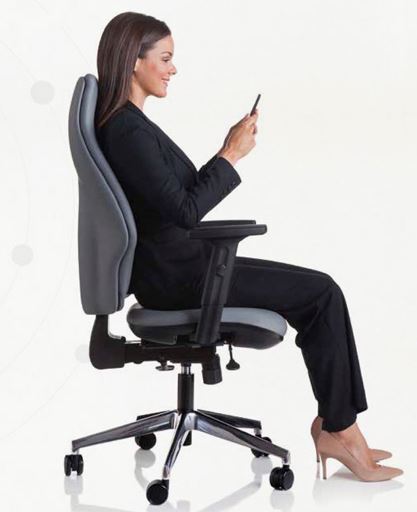
An ergonomic office chair provides crucial support in three areas. First to consider is back support.

The back of the chair should curve with your back to support the back and shoulders. Without proper support, the lower back muscles often work overtime to make up for all of the sitting that happens throughout the day.


Next, the cushioning on the seat of the chair plays a major role. This cushioning supports the spine as you sit. Over time, cushioning can compress or spread out and require replacing. No chair will last forever.


Lastly, the position of your armrests can dictate your posture.  When your arms are gently supported with your hands near your lap and your elbows at approximately a 90-degree angle, the stress on your neck, shoulders and wrist is minimized.


Below is just one of the many office chairs we supply that can help with all of the above. Just click the photo to have a browse.


  1. Poor Posture Due to Device Placement


A good office chair is only helpful if you actually make the most of the features built into the ergonomic chair. Leaning forward or slouching can render even the best office chairs useless.


One of the main reasons people lean and slouch at their desk is because the devices they use are not placed correctly. Your keyboard, mouse, and computer monitor all play an important role in office ergonomics.


When setting up your monitor you want the text to be in line with your eyes. Sit down in your chair with your feet flat on the ground and assess if your monitor needs to be raised or lowered.


Next, look at your keyboard and mouse. If needed, raise or lower your keyboard tray or even move your keyboard and mouse to accommodate your height.  Incorrect laptop height leads to additional pressure on the wrist and shoulders.


  1. Prolonged Periods of Sitting


Earlier we mentioned that most office workers spend more than 7 hours per day sitting at their desk. Having a great ergonomic chair is a good start but it doesn’t change the fact that you are sitting for a very large portion of your day.


Find opportunities to do something other than sit. Set timers to go for a walk or do some stationary stretches. Sitting is one of the largest ergonomic hazards in the office and your chair can’t change that.


You may also want to consider a height-adjustable desk that can alternate from standing to sitting and back. This allows you to change your position throughout the day and doesn’t require you to either sit all day or stand all day.


Our Leap Sit + Stand Desk is available to view in our Showroom or click the link on the photo to see more information.


All photos are linked to our website and you can call us on 021 4277841 to discuss some of the products featured or leave a comment below.

Office Chairs for Every Need!!


An office chair is used for so many reasons, beyond simply sitting at your desk and carrying out your work. For example, any office will have several different types of office chairs, including executive boardroom chair, stacking chairs for meetings and trainings, chairs for back pain, and so many more. But how do you know which is the best office chair? How do you decide which is the best office chair for a specific purpose?

In our blog, we run through the best office chair for every occasion and purpose. From the best computer chair to the best office chair for back pain, we’ve covered every possibility and suggested the best office chair for your needs.


Computer Chair


For anyone spending a significant amount of time at their desk working on a computer, it’s vital that they have a good computer chair.

You’ll want something that supports your body and allows you to move freely and naturally, reducing the stiffness and tension that can so easily come with spending many hours working in front of a computer. Something like this Action 24/7 would be the best computer chair for individuals who spend most of their working hours at a desk.


Ergonomic Office Chair


An ergonomic office chair is key for supporting your body while you work at your desk. These specially designed office chairs target areas of your body to offer extra support and reduce the amount of stress that is put on your body while sitting. The right ergonomic office chair can also go a long way in ensuring that you sit with the correct posture.

The best ergonomic office chair will address all these areas, and any chair with design your own options, like the Reed is even better.


Chair for Back Pain


Because the human body is only designed to sit for short periods of time, the hours of sitting that come with modern life can cause damage to our bodies. Many people who have a job which requires them to sit in front of a desk for extended periods of time experience back pain and stiffness.

The best chair for back pain should offer extra lumbar support and would be highly adjustable to suit your individual needs. We would suggest the Orthopaedica as a great example of this.


Chair for a Home Office


A home office chair will be used for many purposes, so you will want something that is versatile. You might also want something that is smaller, lighter and more delicately designed than a traditional office chair so that it fits nicely in your home, both from a size and design perspective. A great example is the best chair for a home office is the Liberty which is aesthetically pleasing, comfortable and adaptable.


Executive Chair


An executive chair should combine the effective design of a supportive office chair with a luxurious feel and look. The right executive chair is very important to any business, because the right design and comfort can help make a positive impression on visiting clients and customers.

The best executive chair will make a big impact on those sitting in it, and should offer the best support through flawless ergonomic design to both visitors and employees. An example of a great executive chair would be the Seven chair.


Stacking Chairs


Stacking chairs are essential for any office that holds regular staff meetings, training’s, or networking events. Stackable chairs are ideal because they are compact and can be easily stored without taking up too much room when they are not being used. The best stacking chair will be functional, discreet and still comfortable so that employees and visitors don’t become stiff or achey. The Tino Chair ticks all these boxes and looks great!


Office Sofa


Functional office furniture is not only limited to chairs. Office sofas are perfect for reception areas so that clients and visitors have a comfortable and stylish place to wait for their appointment. They can also be extremely useful in break areas so that employees have somewhere to get away from their desk or to take their break.

The best office sofa will be made from durable fabric, offer a stylish design and be comfortable to sit on. Something like the Sofa linked above would be perfect, whether you need a sofa for reception or the break room


All photos are linked to our website and you can call us on 021 4277841 to discuss some of the products featured or leave a comment below.


How to Create a More Customer-Friendly Office Space

You only get one chance to make a great first impression.


That saying is just as true when it comes to your business and the impression you leave with your customers. Specifically, your office space is one way you communicate strong messages to them, whether that’s a warm and inviting one or one that says you really don’t care about your customers all that much.

When you pay a little extra attention to what kind of message you are communicating when someone walks through your doors, you could see a drastic difference in the relationships you have with those customers and even a nice boost in your business.


Tips for a Customer-Friendly Office


Position Someone to Greet Visitors in the First 7 Seconds


You only have seven seconds to make a good first impression. Wouldn’t you want a welcoming, smiling face to be part of those moments? The best thing you can do is position someone either at a front desk or within eye-shot of the door to ensure that each customer is greeted when they walk in the door. Now that’s a lasting impression you want to make.


Choose Your Colors Wisely

Colors will play an important role in communicating to your customers. While the colors people see in your office may differ slightly by your industry or overall company branding, there are certain colors that come off more friendly and welcoming than others.

color palatte
In this color wheel you can see how different colors give off different vibes and how that can affect the atmosphere and experience of your customers.

Want to give off the impression of trust and reliability, say for your bank or accounting office? Try to incorporate blues, purples, greens or oranges into your office furniture and walls.
Or do you want to relax people when they come in, like at a massage therapy business or salon, try adding yellow, green, teal or violet shades to your space.


Offer a Designated Customer Seating Area


While not every office needs a customer-focused seating area, many could benefit from one (even a small one at that).

One of the best business strategies your company can have is to constantly point the focus back on your customers instead of yourself. By having a designated area that’s set up just for your customers, you make them feel welcome and valued by your business.


Providing Comfortable Seating is Essential


What kind of seating you provide can also make a big difference in your customer’s impression of your business.

While some offices like doctors offices benefit from having separate chairs, others can make a bigger, bolder and more personable impression by offering more stylish and comfortable seating.

The more comfortable you make your customers, the better the experience they’ll have with you, and the more likely they’ll want to continue doing business with you and refer you to others.


Offer More Than Just a Place to Sit


Whether it’s the newest magazines, a view of a TV or complementary coffee and snacks, one of the best things you can do to leave a great, lasting impression is to provide something else of value to your customers.


Keep Your Visible Space Neat & Tidy


Clutter can quickly create chaos for both you and your guests. That’s why it important to keep your welcome areas and visible spaces organized (but “worked in”) as much as possible.

If you’re like some of us, your desk can quickly get overwhelmed with papers, sticky notes, and empty coffee mugs, but there are a few tricks to overcoming the clutter.


Storage, Storage, Storage!

There are ways to easily hide the clutter in a stylish manner. Take these cabinets for instance; they provide ample storage for you to keep your documents and free standing items organized, but they also look sharp and actually add to the look of the space.


The Desk Illusion

There are strategically designed office pieces that make it easier to hide the everyday clutter such as this front elevated reception desk.


Integrate Greens Into Your Space

There’s something about green plants and flowers that liven up an indoor space. Lining the reception area or even your own personal office with bright plants (pst…they don’t even have to be real) can provide a welcoming touch for guest.


Call us on 021 4277841 to discuss some of the products featured or leave a comment below.

Office Furniture Buying Mistakes That’ll Cost You Big

While picking out furniture for your office seems like a relatively easy task, in reality, it’s about much more than just looks and comfort.
There are a number of factors that have to be considered in order to get the best value for your buck. By avoiding these five common furniture buying mistakes, you’ll ensure that the furniture that you choose will help to improve work productivity and employee satisfaction.

1. Choosing Price Tag Over Value

Hey, we’re the first to admit that we love a great deal! There is no shame in bargain shopping for the essentials, but when it comes to your office furniture, cheaper is definitely not better.

Why? Because typically cheaper means the furniture was made cheaper (poorer quality materials, mass produced for volume, etc… ). And that means that it just won’t last you as long as it should, ultimately costing you more time and way more money in the long run.


Takeaway:

When looking for new furniture for your office, don’t fall into the trap of a cheap red price tag. You’ll want to think of your furniture as an investment, that will return value both financially and physically in the long run.(Pictured: Executive Desk)


2. Purchasing Without a Plan

If you don’t know what you want when you go to look for furniture, you’re going to end up wasting your precious free time, and no one has enough of that in general right now. Frustration will kick in and, sometimes, people will end up making rash decisions on pieces they regret in the long run.


Takeaway:

To set yourself for success, you’ll want to assess what your needs are. Do you need a cabinet to go along with your desk for storage? Do you want to be able to sit and stand while you work?


You’ll also want to assess what you’ve liked about the furniture you’ve had in the past as well as what you’d like different. Not enough back support? Too easily scratched and stained?


And lastly, while it’s fun to make decisions based on what’s trending, you may want to consider investing in pieces of office furniture that are timeless, as well as stylish. That way you won’t find yourself two years down the line wishing you had not bought that stained glass desk.(Pictured: Sit and Stand Desk)


3. Choosing Style vs Comfort

The saying, “Beauty is pain.” just doesn’t work in this scenario. In reality, comfort is a huge factor in the overall productivity of workers in an office setting, and the way that ultimate comfort is achieved is with an ergonomically sound workspace. You may be tempted to go with what looks good, but if it doesn’t support you or your employee’s physical needs, work will suffer in the end.


Takeaway:

Luckily, furniture manufacturing companies have taken giant strides in the area to provide options for furniture that is comfortable and ergonomically sound, as well as stylish.

Look for furniture that has been designed and tested to properly support your body while you work throughout the day.

We work many companies that can  specifically design chairs and workstation essentials with ergonomics and style first in mind.(Pictured: Orthopaedica)


4. Forgetting True Cost of Ownership

It’s common to forget that the price tag of your furniture is not the only cost you may incur throughout the purchasing and installation phase. It’s important to remember to add items such as freight charges, packaging and handling costs, taxes, and any installation or assembly chargers that’ll be tacked on. Before you sign on the dotted line (or on the digital screen), make sure you talk to your vendor about what the total cost would be after you factor in all these potential additional charges.


Takeaway:

When shopping around, make sure to ask your vendor what all the costs of purchasing would be to avoid any credit card surprises.


5. Buying Without a Growth Mindset

Whether you only need a few pieces of furniture at the moment or you are buying in bulk to furnish an entire office building, one of the biggest mistakes organizations make is not buying with future growth in mind.

What people end up with is furniture that doesn’t adapt to your changing technology or workspace and/or mismatched furniture through the entire office making it feel like you’re all working for different companies.


Takeaway:

When buying furniture, look for pieces that would look good across the entire organization and ones that can be easily moved or reconfigured to fit your changing needs. Many companies have cohesive collections of furniture that allow you to grow and add at your pace.


Call us on 021 4277841 to discuss some of the products featured or leave a comment below.

Saving the Planet in the Office!!

Our whole lives we’ve heard, “Reduce. Reuse. Recycle.” Use less paper, buy reusable grocery bags, and recycle plastic bottles. Those are obvious, well-known ways to help our planet, but what are other ways to keep our life-long home safe and clean, especially in the workplace.


Power Saver:

This one sounds pretty obvious. Put your computer on auto sleep mode so if you are away long enough then your computer won’t be wasting excess energy. When you go to lunch, you can put your computer to sleep, but it saves much more energy if you shut down your computer. If the purchasing department of the company allows it, get LED or compact fluorescent light bulbs. They last much longer and are well-known energy savers.


AC/Heater:

In the middle of the summer, it can be hard to turn down the AC. Having it on high is a very bad energy waster, though. It’s okay to have it on to a certain temperature, but it’s much more energy efficient to give employees small desk fans as they need them. As for the winter, you can also have some heat on so no one gets hypothermia , but keep it a little lower and tell workers to bundle up if needed.


Carpool:

Some may think this is an awkward conversation to have with coworkers, but you’d be surprised how many people who live nearby would be willing to help save the environment (and money) by carpooling. Cars use many fuels that are harmful to the environment and even toxic to humans, animals, and plants. Decrease the amount of harm we place on our home by simply tag teaming with a few buddies.


Less Paper:

Computers may not be great energy savers themselves, but the sheer amount of paper used on a daily basis in the office is drastically worse. Many documents could be emailed and saved on a hard drive rather than printed out and stuffed in a filing cabinet. Plus, it can be a lot easier to sort and search for those documents digitally than by hand. As for to-do’s that we often put on sticky notes or paper pads, use a white board instead. Then you can simply erase it instead of throwing away many notes per day.


Spread the Word:

Many people have heard all of these suggestions, but they simply aren’t motivated to do something about it. When one person announces they are going to try and make a difference, it can spark a desire in others to do so as well. It’s a great way to find carpool buddies and an accountability partner or two. One person can make a difference in many lives, and in saving the world.


Call us on 021 4277841 to discuss some of the products featured or leave a comment below.